Clean Your Phone.
Free Up Storage.
Phone Diet: Clean Up Storage runs on iPhone and iPad. Similar Photos groups near-identical shots and marks the best one 'Keep'. Duplicates are exact copies. Photos never leave the device. Compress videos with HEVC, up to 70% smaller. Undo has a countdown, and Recover keeps removed items for 30 days, or 7 or 60.
Your phone is full of stuff
you don't need
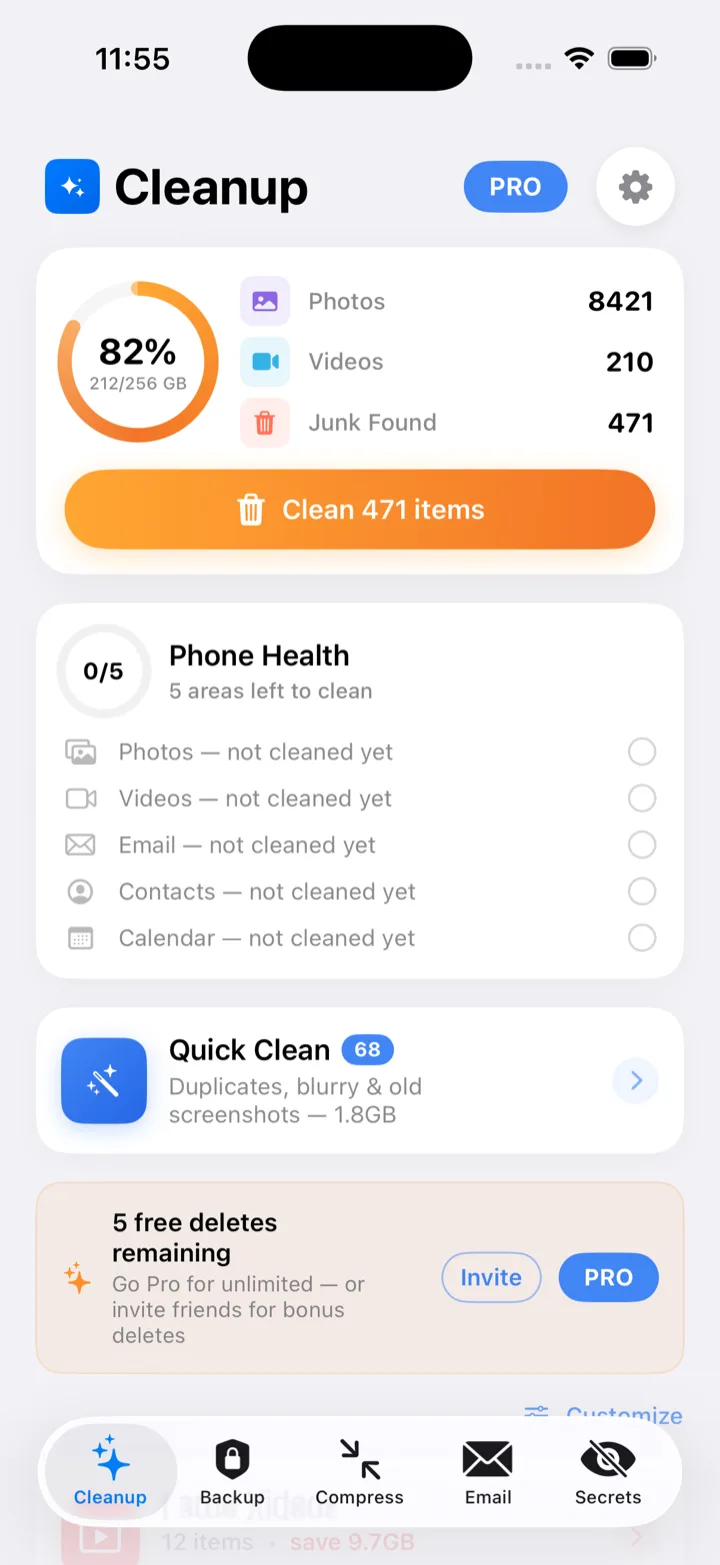
Phone Diet scans photos, videos, and email on your iPhone.
😩 Before
✨ After
Every cleanup tool you need.
One beautiful app.
Photo cleaning, video compression, email cleanup, a private vault, and tools for iPhone and iPad.
Photo and video cleanup on iPhone and iPad
Similar Photos groups near-identical shots and marks the best one 'Keep'. Duplicates are exact copies. Also blurry and dark photos, screenshots, screen recordings, Live Photos, bursts, and Largest Files. Smart Albums, swipe to sort, and On This Day. Photos never leave the device.
- ✓Similar Photos and Duplicates
- ✓Smart Albums
- ✓Swipe to sort and On This Day
Email cleaner for the inboxes you already use
Clean Gmail, iCloud, Outlook, Yahoo, AOL, and IMAP. Gmail Auto Clean uses rules, with a 30-second undo on category cleans. The app does not send notifications.
- ✓Gmail, iCloud, Outlook, Yahoo, AOL, and IMAP
- ✓Gmail Auto Clean rules
- ✓30-second undo on category cleans
Shrink videos up to 70%
Compress with HEVC, up to 70% smaller. A minute of 4K video at 60 fps is about 400 MB.
- ✓HEVC compression
- ✓Up to 70% smaller
- ✓On-device
Inbox zero, any email
Works with Gmail, iCloud Mail, Outlook, Yahoo, AOL, and IMAP.
- ✓Gmail, iCloud, Outlook, Yahoo, AOL, and IMAP
- ✓On your iPhone
Delete safely, restore anytime
Undo has a countdown. Removed items stay in Recover for 30 days, or 7 or 60. The app does not send notifications.
Private Vault
The Private Vault hides photos behind Face ID, Touch ID, or a passcode. Encrypted, stored only on the device.
Swipe to sort
Swipe to sort photos on your iPhone. Removed items can stay in Recover for 30 days, or 7 or 60.
More tools in the same app
Contact Cleaner merges duplicates in one tap (back up the address book first). Calendar Cleaner, Speaker Cleaner, an HEIC converter, widgets for storage and battery on the Home Screen and Lock Screen, and a Safari ad blocker.
See it on a real iPhone
Screens from Phone Diet. Tap an image to enlarge.


Your photos never leave your iPhone.
On-device scanning. Photos never leave the iPhone. No ads. No tracking.
On-device scanning
Photo and video scanning runs on your iPhone. Your photos never leave the device.
Email goes provider-direct
The email cleaner works with Gmail, iCloud, Outlook, Yahoo, AOL, and IMAP.
Safari ad blocker
Phone Diet includes a Safari ad blocker. The app does not send notifications.
No ads, no tracking
No ads and no tracking.
On-device Recover (30-day undo)
Every cleaned photo and video is held in Recover (30 days by default, or 7 or 60). Photos never leave the iPhone.
Built with Apple's privacy stack
No ads and no tracking. Photos stay on the iPhone.
What the App Store listing includes
Phone Diet: Clean Up Storage by Gigabyte LLC. Utilities. English. iPhone and iPad (iOS 17.0 or later, or iPadOS 17.0 or later). The app does not send notifications.
Swipe to sort
Sort photos on iPhone and iPad. Scanning stays on the device.
On This Day
Look back at photos from this day on your iPhone.
HEIC converter
Convert HEIC photos on the iPhone. HEIC to JPEG guide
HEVC video compression
Compress video with HEVC, up to 70% smaller. A minute of 4K video at 60 fps is about 400 MB.
Contact and calendar cleaners
Contact Cleaner merges duplicates in one tap. Back up the address book first. Calendar Cleaner is included. Why contacts duplicate
Email cleaner
Gmail, iCloud, Outlook, Yahoo, AOL, and IMAP. Gmail Auto Clean rules, with a 30-second undo on category cleans.
Speaker cleaner
Clean the iPhone speaker on the device. What to do with a wet iPhone
Recover
Undo has a countdown. Removed items stay for 30 days, or 7 or 60 days if you choose. The app does not send notifications.
Storage saved, stress removed
What Phone Diet includes
On-device scanning, no ads, and no tracking.
| Feature | Phone Diet | Other Apps |
|---|---|---|
| Similar Photos, Duplicates, blurry and dark photos, screenshots, screen recordings, Live Photos, bursts, and Largest Files | ✓ | ✓ |
| Video compression (HEVC, up to 70% smaller) | ✓ | — |
| Email cleaner, including Gmail Auto Clean rules with a 30-second undo on category cleans | ✓ | — |
| Undo with a countdown; Recover for 30 days, or 7 or 60 | ✓ | — |
| Private Vault (Face ID, Touch ID, or a passcode; encrypted; on device) | ✓ | — |
| Swipe to sort | ✓ | ✓ |
| Smart Albums | ✓ | — |
| On This Day | ✓ | — |
| HEIC converter | ✓ | — |
| Contact Cleaner (one tap; back up the address book first) and Calendar Cleaner | ✓ | — |
| Speaker Cleaner | ✓ | — |
| Widgets for storage and battery on the Home Screen and Lock Screen | ✓ | — |
| Safari ad blocker | ✓ | — |
| No ads, no tracking | ✓ | — |
| Photos stay on the device (iPhone and iPad) | ✓ | ✓ |
Start free. Upgrade anytime.
Free with in-app purchases. The full scan is free, and the first cleanup of up to 1 GB is free. Weekly $4.99, Monthly $12.99, Annual Premium $34.99, Lifetime $59.99. Prices are in USD. The App Store charges in your local currency.
Weekly
- Photo, video, and email cleanup
- HEVC compression, up to 70% smaller
- Private vault and Safari ad blocker
Monthly
- Photo, video, and email cleanup
- HEVC compression, up to 70% smaller
- Private vault and Safari ad blocker
Annual Premium
- Photo, video, and email cleanup
- HEVC compression, up to 70% smaller
- Private vault and Safari ad blocker
Lifetime
- Photo, video, and email cleanup
- HEVC compression, up to 70% smaller
- Private vault and Safari ad blocker
Cancel anytime. Subscriptions managed through the App Store.
Common questions
Photo and video analysis happens on your iPhone and nothing from your library is uploaded. Photo cleanup works offline. The Email Cleaner talks directly to your mail provider, and the only data sent to us is anonymous crash reports.
Undo has a countdown. Cleaned photos and videos go to the Recover tab first, where they are kept for 30 days by default (you can choose 7, 30 or 60). Restore any item from Recover, with its original date and location.
Phone Diet compresses video with HEVC, up to 70% smaller. A minute of 4K video at 60 fps is about 400 MB. Removed items can stay in Recover for 30 days, or 7 or 60.
Yes. The email cleaner works with Gmail, iCloud, Outlook, Yahoo, AOL, and IMAP.
Yes. The full scan is free, and the first cleanup of up to 1 GB is free. After that, cleaning is part of the in-app purchases: Weekly $4.99, Monthly $12.99, Annual Premium $34.99, or Lifetime $59.99.
Yes. Phone Diet runs on iPhone and iPad. It requires iOS 17.0 or later, or iPadOS 17.0 or later. English only.
Similar Photos groups near-identical shots and marks the best one 'Keep'. Duplicates are exact copies. Phone Diet also finds blurry and dark photos, screenshots, screen recordings, Live Photos, and bursts, and it lists Largest Files. Photos never leave the device. It compresses video with HEVC, up to 70% smaller, cleans email for Gmail, iCloud, Outlook, Yahoo, AOL, and IMAP, and includes contact and calendar cleaners plus Recover.
Cancel anytime in Settings on your iPhone: tap your name, then Subscriptions, then Phone Diet: Clean Up Storage. You keep access until the end of the billing period.
Yes. Contact Cleaner merges duplicates in one tap. Back up the address book first. Phone Diet also includes a Calendar Cleaner.
The listing does not state a typical amount of space freed. Video compression uses HEVC and can make a video up to 70% smaller. A minute of 4K video at 60 fps is about 400 MB. The full scan is free, and the first cleanup of up to 1 GB is free.
Phone Diet compresses video with HEVC, up to 70% smaller. A minute of 4K video at 60 fps is about 400 MB.
Yes. Lifetime is $59.99. Weekly is $4.99, Monthly is $12.99, and Annual Premium is $34.99. The app is free with those in-app purchases. The full scan is free, and the first cleanup of up to 1 GB is free.
Yes. The Private Vault hides photos behind Face ID, Touch ID, or a passcode. It is encrypted and stored only on the device. Read our full guide on how to hide photos on iPhone.
Swipe to sort is included. Removed items can stay in Recover for 30 days, or 7 or 60.
Yes. Phone Diet includes an HEIC converter. See our guide on converting HEIC to JPEG on iPhone.
The full scan is free, and the first cleanup of up to 1 GB is free. The app is free with in-app purchases: Weekly $4.99, Monthly $12.99, Annual Premium $34.99, and Lifetime $59.99.
Yes. Widgets for storage and battery on the Home Screen and Lock Screen.
Apple handles all refunds for App Store purchases. Go to reportaproblem.apple.com, sign in with your Apple ID, find Phone Diet and choose Request a Refund.
When the phone is actually full
Start with the problem. The cleanup guides underneath are the same steps those pages send you to.
Right now
Before you buy or transfer
The cleanups
Popular iPhone storage guides
The questions that keep coming up once the phone is already full. Each one is a single job.
- Apple Intelligence storage on iOS 27
- Storage full after an iOS update
- Baby photos filling your iPhone
- Google Photos didn’t free the phone
- Move photos to an external drive
- Delete old podcasts
- Delete voice memos
- Storage full before a trip
- Delete Safari downloads
- Delete Telegram media
- Delete Apple Music downloads
- Delete blurry photos
Your phone deserves
to breathe again.
Download Phone Diet. The full scan is free, and the first cleanup of up to 1 GB is free.
Download for iPhone and iPad — FreeAvailable on the App Store · First cleanup free, up to 1 GB